Objective#
Simulate an SSH brute force attack from a Kali Linux machine against an Ubuntu 22.04 agent, observe Wazuh detection capabilities, identify gaps in the default ruleset, and configure automated response.
Environment#
| Role | OS | IP |
|---|---|---|
| Attacker | Kali Linux | 192.168.248.129 |
| Agent | Ubuntu 22.04 Server | 192.168.248.140 |
| Wazuh | Ubuntu 24.04 Server | 192.168.248.50 |
Attack Simulation#
The attack was simulated using Hydra from the Kali Linux machine targeting the Ubuntu 22.04 agent over SSH. Two brute force attempts were executed against different usernames:
1# Attempt 1 — targeting root
2hydra -l root -P /usr/share/wordlists/fasttrack.txt ssh://192.168.248.140
3
4# Attempt 2 — targeting user 'w'
5hydra -l w -P /usr/share/wordlists/fasttrack.txt ssh://192.168.248.140
Each run tried 262 passwords at ~220 attempts/min. Both attempts failed — no valid credentials were found. Total duration: ~1 min 17 sec per run.
What Wazuh Detected#
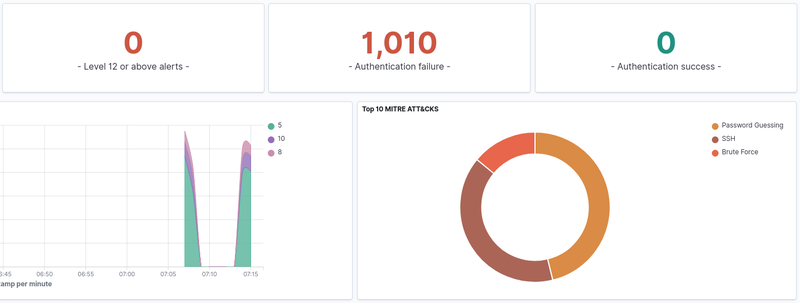
Wazuh generated 1,010 authentication failure alerts across both runs. 0 successful logins were recorded. Two distinct spikes are visible on the timeline (~07:08 and ~07:15), corresponding to each Hydra run. MITRE ATT&CK: T1110.001 - Brute Force: Password Guessing via SSH.
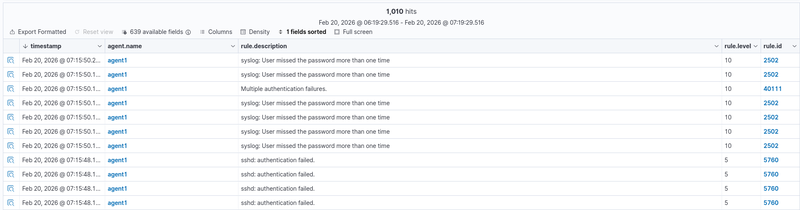
Seven rule IDs were triggered during the attack:
| Rule ID | Level | Description |
|---|---|---|
| 5760 | 5 | sshd: authentication failed |
| 5551 | 5 | sshd: Invalid user |
| 5503 | 5 | sshd: Connection closed |
| 5768 | 5 | sshd: Maximum authentication attempts exceeded |
| 2501 | 5 | User missed the password |
| 2502 | 10 | User missed the password more than once |
| 40111 | 10 | Multiple authentication failures |
Rules 5760, 5551, 5503, 5768, and 2501 fire per individual event (level 5). Rules 2502 and 40111 are correlation rules that aggregate multiple failures into a higher severity alert (level 10). Notable: 0 alerts reached level 12 or above — addressed in Tuning section.
Expanded view of a single Rule 5760 alert:
- Source IP: 192.168.248.129
- Target user: w
- Source port: 41772
- Full log: Failed password for w from 192.168.248.129 port 41772 ssh2
- MITRE: T1110.001 - Password Guessing / T1021.004 - SSH
- Fired times: 533
 1{
 2  "agent": { "ip": "192.168.248.140", "name": "agent1", "id": "001" },
 3  "data": { "srcip": "192.168.248.129", "dstuser": "w", "srcport": "41772" },
 4  "rule": {
 5    "id": "5760",
 6    "level": 5,
 7    "description": "sshd: authentication failed.",
 8    "firedtimes": 533,
 9    "mitre": {
10      "technique": ["Password Guessing", "SSH"],
11      "id": ["T1110.001", "T1021.004"],
12      "tactic": ["Credential Access", "Lateral Movement"]
13    }
14  },
15  "full_log": "Feb 20 12:15:46 w sshd[7202]: Failed password for w from 192.168.248.129 port 41772 ssh2",
16  "timestamp": "2026-02-20T12:15:48.177+0000"
17}
What Was Missed & Why#
No Level 12 or above alerts were triggered during the initial simulation. Wazuh’s built-in ruleset caps brute force detection at Level 10, meaning the attack would not trigger a critical notification by default — a potential blind spot in a real SOC environment.
Tuning & Custom Rules#
To address the detection gap, a custom rule was created in
/var/ossec/etc/rules/local_rules.xml:
1<group name="sshd,authentication_failed,">
2  <rule id="100001" level="12">
3    <if_matched_sid>40111</if_matched_sid>
4    <description>SSH Brute Force: High volume of authentication failures from same source</description>
5    <mitre>
6      <id>T1110.001</id>
7    </mitre>
8  </rule>
9</group>Response#
After the custom rule 100001 triggered, Wazuh executed the built-in
firewall-drop active response on agent1, automatically blocking
the attacker’s IP via iptables. The active response was configured
in /var/ossec/etc/ossec.conf:
1<active-response>
2  <command>firewall-drop</command>
3  <location>local</location>
4  <rules_id>100001</rules_id>
5  <timeout>180</timeout>
6</active-response>
The effect was immediately visible in Hydra’s output — attempt rate dropped from 107 tries/min to 44 tries/min as connections began failing, and eventually all tasks were disabled:
1[ERROR] all children were disabled due too many connection errors
2[ERROR] 1 targets did not complete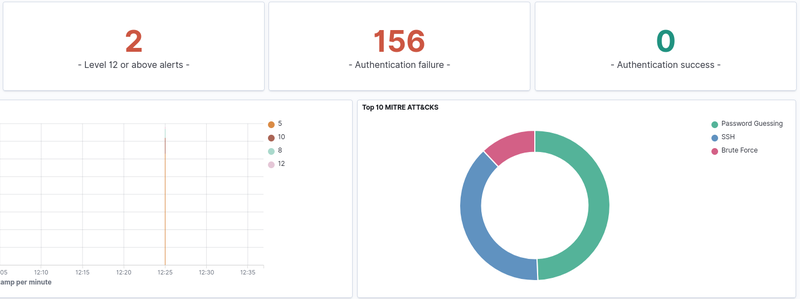
Level 12 alerts: 2 — rule 100001 fired successfully.
Expanded view of Rule 100001 alert:
- Rule ID: 100001 (custom)
- Level: 12
- Source IP: 192.168.248.129
- Target user: w
- Fired times: 2
- mail: true — level 12 triggers email notification if configured
- Full log: maximum authentication attempts exceeded for w from 192.168.248.129
- MITRE: T1110.001 - Credential Access: Password Guessing
The block was automatically lifted after the configured timeout of 180 seconds.
To make a permanent block, the timeout value can be set to 0.
Conclusion#
Wazuh successfully detected the SSH brute force attack out of the box, generating 1,010 alerts across 7 rule IDs. However, the default ruleset did not escalate the alert to critical severity (level 12), which would be a gap in a real SOC environment where level 12 triggers priority notifications.
Adding a single custom rule resolved this gap and enabled automated IP blocking via active response — stopping the attack mid-execution without any manual intervention.
Key takeaways:
- Default Wazuh rules detect brute force but cap at level 10
- Custom rules can bridge the gap with minimal configuration
- Active response provides automated containment within seconds of detection
- Timeout-based blocks are suitable for automated response; permanent blocks require manual review to avoid blocking legitimate users